Digital workplace passes— directly on employee phones
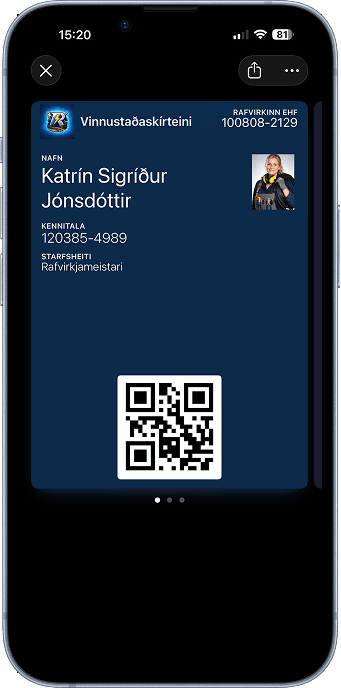
Lykilkort enables contractors and service companies to create legal workplace passes that go directly into employees' Apple and Google Wallet. Simple, secure and compliant with legal requirements – without plastic cards and manual work.
Sound familiar?
Many companies struggle to manage workplace passes and employee access
Complex issuance and management
Printing plastic cards, manual updates and distribution take unnecessary time and effort.
Plastic cards get lost
Lost cards cause increased costs and unnecessary security risks at work sites.
Time-consuming manual registration
Registration of employees and contractors is often in multiple systems, making changes slower.
Limited oversight and control
Without oversight, it's difficult to know who has a valid workplace pass at any time.
Digital workplace passes
Lykilkort solves these problems with a simple digital system.
Digital passes on phones
The pass goes into the employee's phone wallet — always accessible on their phone.
Automatic expiration
Passes expire automatically when the validity period ends.
Management in seconds
Create, update or revoke passes instantly
Oversight with dashboard
See all active access in one place with status and expiration dates.
How does it work at the workplace?
From issuance to scanning at the gate — all in minutes.
Send SMS or email
Send an employee or contractor a link to the pass via SMS or email.
Add to Wallet
They click the link and add the pass to Apple or Google Wallet.
Show at entrance
The pass is shown at the gate — visually or with QR code based on your process.
Expires or is revoked
The pass expires automatically or you revoke it immediately if access should stop.
What do you get?
Faster check-in at work sites
Employees and contractors get passes in minutes instead of waiting for plastic cards.
More control and better security
You always know who has access — and can stop access immediately when needed.
Less admin and cost
No printing, no shipping and far fewer manual processes in daily operations.
Traceability
Track issuance, changes and status — useful for internal audits and follow-up.
Example passes
Customize the pass to your needs — colors, logo and information.
Frequently asked questions
Answers to common questions about workplace passes.
No. The pass goes into Apple Wallet on iPhone or Google Wallet on Android. Most phones have this installed or it's easy to download.
You can revoke the pass immediately in the dashboard and send a new pass to the new phone in seconds.
Yes. You see a list of all active access in the dashboard with status and expiration dates.
Yes. You can create different templates for projects, work sites or business units and manage expiration dates separately.
Yes. You can revoke a pass with one click and it becomes invalid on the phone.
Issue workplace passes in minutes
Send a link to the pass via SMS or email and the employee adds it to Apple or Google Wallet. Set expiration dates, revoke passes immediately when needed and maintain full oversight in the dashboard.